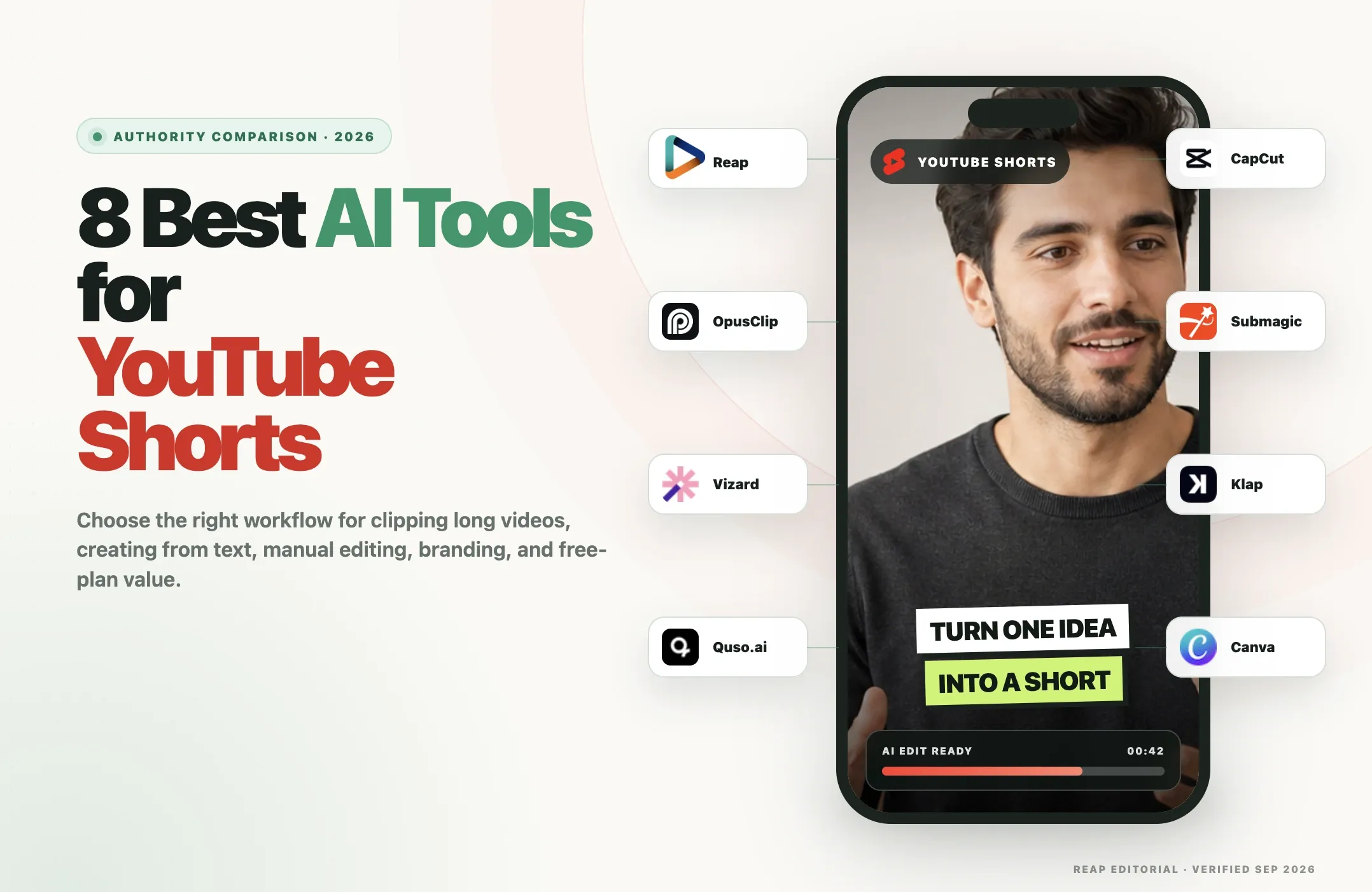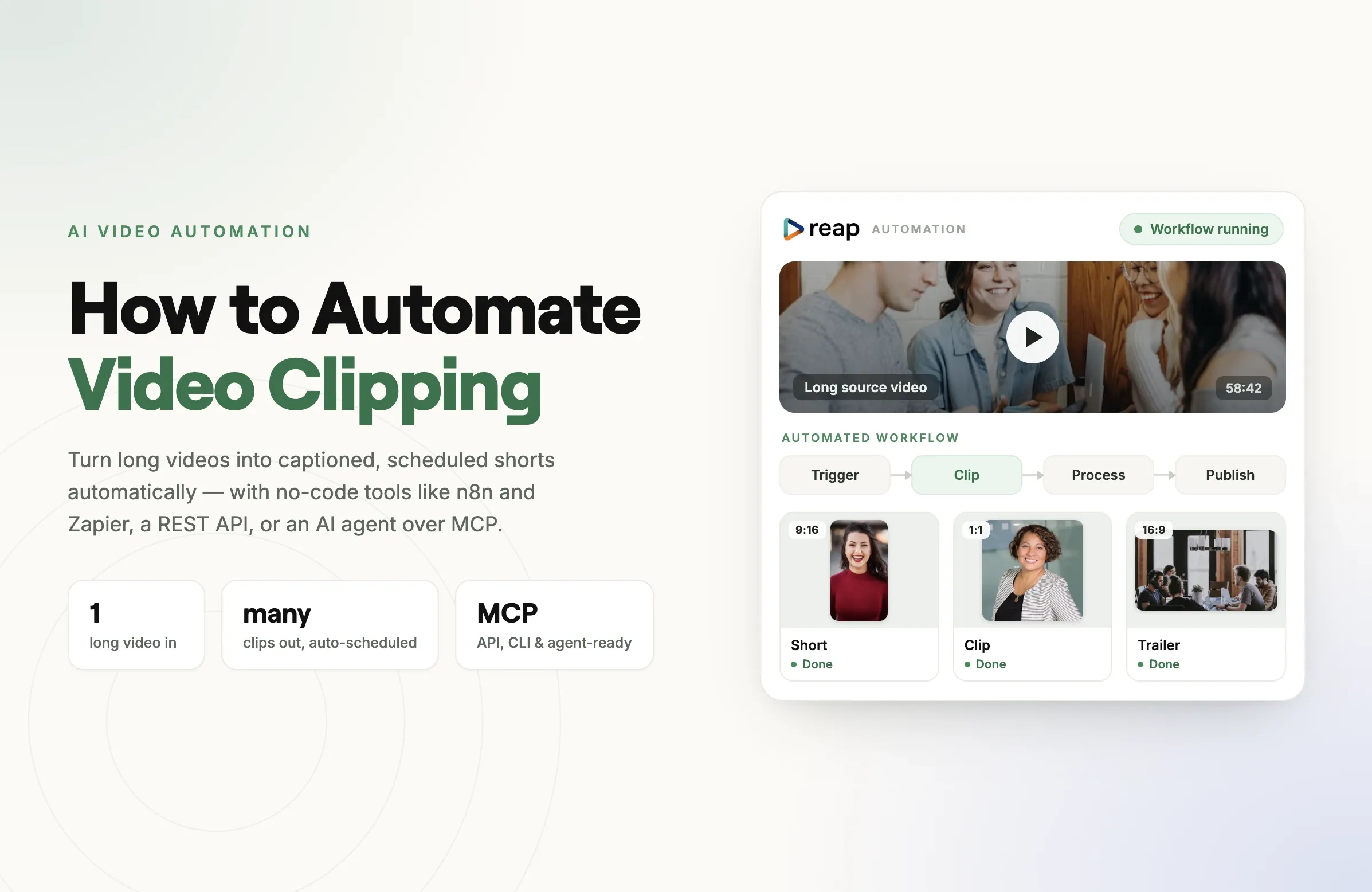
If you want the short answer, Reap is the best AI clipping tool in 2026 for most creators, agencies, and teams, based on our April 2026 benchmark of nine paid tools.
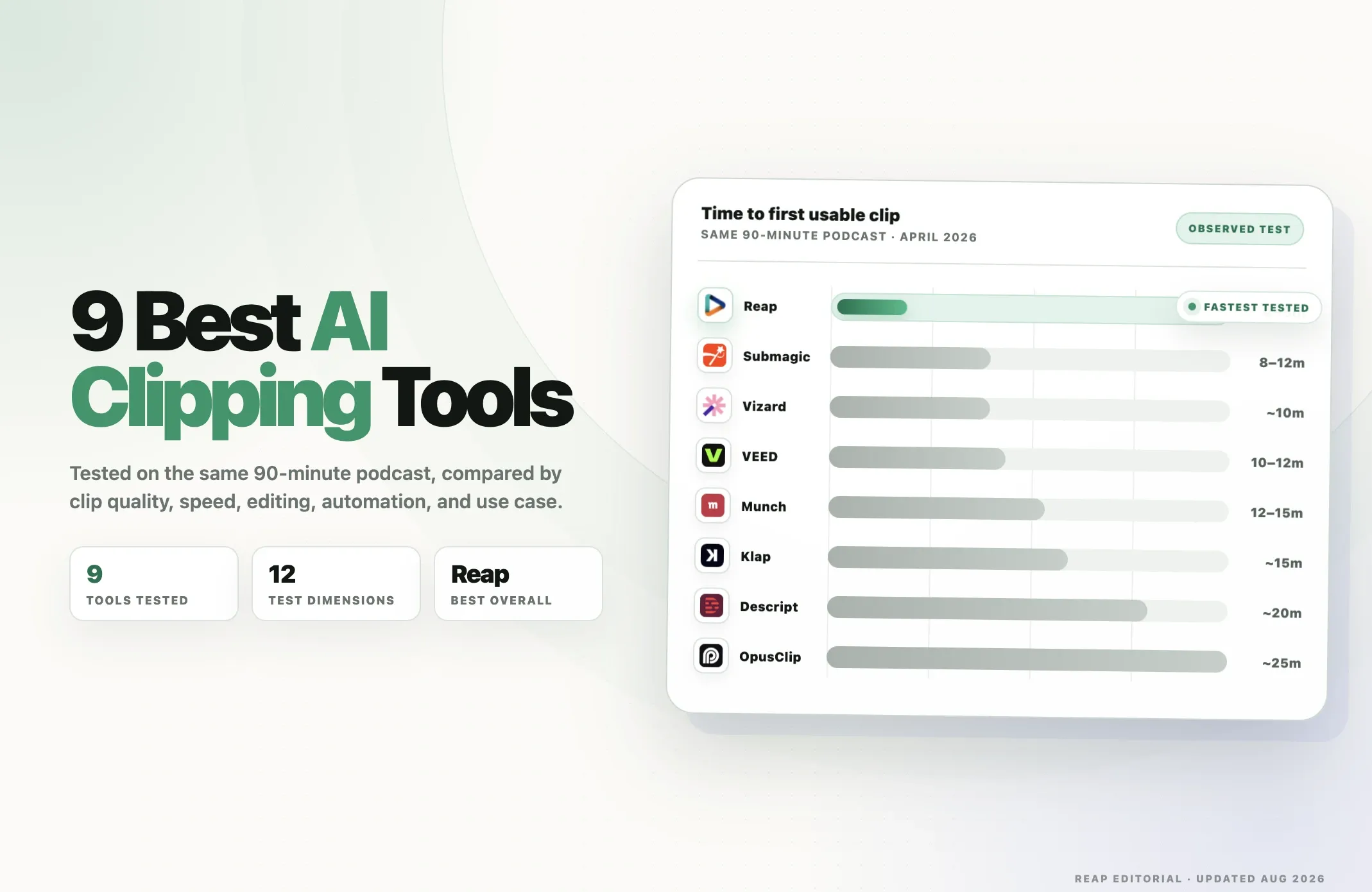
On the same 90-minute podcast, Reap produced its first usable clip in approximately 4 to 5 minutes, compared with roughly 10 minutes for Vizard, 8 to 12 minutes for Submagic, around 15 minutes for Klap, approximately 20 minutes for Descript, and about 25 minutes for OpusClip in the tested workflows.
But "best" depends heavily on what you are clipping.
If you work with podcasts, webinars, interviews, courses, or talking-head content and want clipping, captions, reframing, localization, editing, publishing, and automation in one workflow, Reap is our top pick.
If you primarily clip gaming, sports, reactions, or other visually driven footage, OpusClip's frame-aware ClipAnything workflow deserves serious consideration.
If transcript editing is more important than automation, Vizard or Descript may fit better. If highly stylized short-form captions are the priority, Submagic is one of the strongest options.
This guide breaks down all nine tools, where each performs best, what we found during testing, and which AI clipping software makes the most sense for different workflows.
Best AI Clipping Tools in 2026 at a Glance
|
Rank |
AI clipping tool |
Best for |
Main strength |
|---|---|---|---|
|
1 |
Reap |
Best overall |
Fast clipping + full repurposing + API/MCP automation |
|
2 |
OpusClip |
Visual-heavy clips |
Frame-aware ClipAnything detection |
|
3 |
Vizard |
Transcript-first workflows |
Fast browser workflow + text-based editing |
|
4 |
Submagic |
Caption-heavy Shorts |
Short-form styling and polish |
|
5 |
Klap |
Simple AI clipping |
Focused long-video-to-shorts workflow |
|
6 |
Descript |
Podcasts and text editing |
Edit video by editing text |
|
7 |
VEED |
General browser editing |
Broad all-in-one video suite |
|
8 |
CapCut |
Manual + AI editing |
Huge editing ecosystem with AI clipping |
|
9 |
Munch Studio |
Marketing workflows |
Clipping inside a broader social content system |
Pricing note: Pricing and plan limits change frequently and may vary by region or billing cycle. Plan information in this article was rechecked in August 2026. Our performance measurements come from the April 2026 test window.
How We Tested the AI Clipping Tools
We did not build this list by comparing landing-page feature grids.
For our State of AI Video Clipping 2026 benchmark, we purchased paid access to nine AI video tools and evaluated them across a shared testing framework.
The benchmark covered 12 dimensions across clip discovery, workflow, language support, editing, automation, and throughput.
For the main speed comparison, we processed the same 90-minute bilingual podcast through the tools under comparable conditions and recorded the time required to receive the first usable clip.
The wider test corpus included:
- Podcasts
- Interviews
- Webinars
- Talking-head content
- Gaming footage
- Sports footage
We also evaluated things such as captioning, reframing, editing depth, dubbing, language support, APIs, scheduling, and the amount of manual work required after the initial clip was generated.
A disclosure before the ranking
Reap publishes this article, and Reap is one of the products being compared.
That creates an obvious potential conflict of interest.
Instead of pretending otherwise, we publish the methodology, observed limitations, pricing assumptions, and underlying benchmark separately. When a statement below comes from our April testing rather than a vendor's current product documentation, we say so.
You can review the complete methodology and deeper tool-by-tool data in the full AI video clipping benchmark.
What Makes a Good AI Clipping Tool in 2026?
Almost every serious AI video clipper now promises the same basic workflow:
- Upload a long video.
- Let AI find highlights.
- Turn them into short clips.
- Add captions.
- Reframe them vertically.
That feature list is no longer enough to choose a tool.
The real differences appear after you start using the software repeatedly.
1. Does the clip make sense on its own?
Finding an "interesting" sentence is not the same as finding a good short-form clip.
A useful clip needs enough context to stand alone, a clear opening, a logical ending, and ideally a reason for someone to continue watching.
This is still one of the most important differences between clipping models.
2. Does it understand your type of content?
Talking-head podcasts are easier to analyze through speech and transcripts.
Gaming, sports, reactions, demonstrations, and other visually driven videos require stronger understanding of what is happening in the frames.
A tool can therefore be excellent for podcasts and mediocre for gaming, or the reverse.
3. How much work remains after clipping?
The first AI cut is rarely the final product.
You may still need to:
- Correct captions
- Change the hook
- Reframe a speaker
- Remove a section
- Insert B-roll
- Add a logo
- Add music
- Combine multiple segments
- Translate or dub the video
- Schedule it
The more of that work the same platform can handle, the less time you spend moving between applications.
4. How quickly can you get usable output?
Generating 20 clips is not helpful if processing becomes the bottleneck.
That is why we measured time to first usable clip, not just whether a platform could eventually finish processing.
5. Can the workflow scale?
For one video a month, clicking through a dashboard is fine.
For agencies, media teams, applications, or creators processing dozens of videos, API access, automated publishing, reusable brand settings, batch workflows, and agent access become much more important.
6. Does it support the audience you actually have?
Caption language support, translation, Romanized scripts, and AI dubbing matter if you publish internationally.
A tool with excellent English clipping but weak localization may be perfect for one creator and unusable for another.
With those criteria in mind, here are the nine best AI clipping tools we tested.
1. Reap: Best AI Clipping Tool Overall
Best for: creators, agencies, media teams, multilingual publishers, and automated content workflows.
Reap ranked first overall in our April 2026 benchmark because it combined fast AI clipping with a much broader post-clipping workflow.
On the shared 90-minute podcast test, Reap produced its first usable clip in approximately 4 to 5 minutes, the fastest result in our benchmark.
But speed is only part of why it ranked first.
Reap is designed to take a video beyond the initial clip.
You can use the same platform to:
- Find highlights automatically
- Give the clipping AI specific instructions or topics
- Generate multiple short clips
- Add animated captions
- Reframe horizontal footage for vertical platforms
- Track the active speaker
- Edit the generated clips
- Add B-roll, overlays, logos, intros, outros, and brand assets
- Translate captions
- Generate Romanized captions
- Dub videos into other languages
- Schedule and publish finished clips
- Run clipping workflows through a REST API
- Run workflows from the command line
- Connect Reap to AI agents through MCP
That last category is particularly important for high-volume workflows.
Instead of opening an editor for every video, a team can automate repetitive jobs or use natural-language instructions through supported AI-agent workflows.
If automation is the main reason you are comparing clipping platforms, see our complete guide to automating video clipping.
Reap's language support
Reap currently exposes 100 transcription languages in the product and supports AI dubbing across 80+ languages, including multiple regional locales.
It also supports native and Romanized caption workflows, which is useful for audiences that commonly read languages such as Urdu, Hindi, or Arabic in Latin characters.
Reap's editor
Another advantage is that Reap does not treat generated clips as the end of the workflow.
Clips can be refined inside the editor rather than immediately exported into a second editing application.
That includes:
- Timeline editing
- Caption editing
- Multiple visual layers
- B-roll
- Voiceovers
- Brand assets
- Logos
- Intro and outro elements
- Filters and animations
- Reframing
- Social-ready exports
Reap limitations
No AI clipping tool is best at every source type.
In our benchmark, Reap was less optimized for frame-heavy visual-scene discovery than OpusClip's ClipAnything workflow.
Creators who primarily clip sports, gaming, or videos where the important event is visual rather than spoken should compare both tools.
Reap also has a smaller preset/template ecosystem than large consumer editors such as CapCut and is less caption-style-first than Submagic.
Reap pricing
Reap has a free plan for testing the workflow.
Paid Creator access starts from $9.99/month with annual billing, with higher tiers increasing processing capacity and team features.
API, CLI, and MCP workflows use the same underlying Reap workflow rather than requiring a completely separate product.
Reap verdict
Choose Reap if you do not just want an AI clip generator.
It makes the most sense when your actual workflow is:
long video -> clips -> captions -> reframe -> edit -> localize -> publish
rather than:
long video -> clips -> export to another tool
Best overall: Reap
2. OpusClip: Best for Visual-Heavy AI Clipping
Best for: gaming, sports, reaction videos, visual scenes, and creators prioritizing AI highlight discovery.
OpusClip remains one of the biggest names in AI video clipping, and there is a reason.
Its strongest differentiator is ClipAnything, which analyzes more than spoken words.
The system can use:
- Speech
- Visual objects
- Sound
- Emotion
- Scene context
- Genre-specific signals
That gives OpusClip an advantage when the best moment cannot be identified from a transcript alone.
Think of a goal in a football match, an on-screen reaction, a gaming highlight, or a visually important demonstration.
Where OpusClip performed well
In our testing, OpusClip was particularly compelling for visual-scene workflows.
It also offers a mature short-form workflow around the generated clips, including:
- Virality scoring
- Animated captions
- Automatic reframing
- Editing
- Brand templates
- AI B-roll on higher plans
- Multiple aspect ratios
- Social scheduling
- Video dubbing on Pro
- API access, with broader API/custom integrations available for Business customers
Its ability to accept natural-language direction for clipping also makes it useful when you already know approximately what type of moments you want.
Where OpusClip was weaker in our benchmark
The trade-off was processing time.
On our 90-minute podcast test, OpusClip took approximately 25 minutes to produce the first usable clip in the tested workflow.
That does not mean OpusClip is universally "slow." Frame-aware analysis is doing more work, and that extra analysis can be worthwhile for visual content.
But for high-volume podcast or interview clipping, the difference becomes more important.
OpusClip pricing
OpusClip offers a free plan.
Its Starter plan is currently $15/month, while Pro adds features such as AI B-roll, multiple aspect ratios, scheduling, dubbing, and limited API access.
Business is designed for organizations needing deeper API access, integrations, processing priority, and enterprise support.
OpusClip verdict
Choose OpusClip when understanding what happens visually in the source is more important than maximizing processing speed or building an agent-driven workflow.
For a deeper head-to-head comparison, read Reap vs OpusClip.
Best for visual-scene clipping: OpusClip
3. Vizard: Best for Transcript-First Browser Workflows
Best for: podcasters, marketers, webinars, teams, and users who like editing through text.
Vizard sits somewhere between a dedicated AI clipper and a browser-based video workspace.
Upload a long video and Vizard can transcribe it, identify potential short clips, reframe speakers, add captions, and let you refine the result using a text-oriented editing workflow.
In our benchmark, Vizard produced its first usable clip from the shared 90-minute podcast in roughly 10 minutes.
That made it one of the faster tools we tested.
What Vizard does well
Vizard is particularly easy to understand if your content is speech-heavy.
The transcript becomes a central part of the workflow, making it useful for:
- Podcasts
- Interviews
- Webinars
- Coaching content
- Business videos
- Educational recordings
Vizard also offers a public API on paid plans, so it should no longer be described as a dashboard-only product.
That is an important change from many older comparisons of AI clipping software.
Vizard limitations
Its main advantage is also where the trade-off appears.
For users building complex automated or agent-driven workflows, Vizard does not currently offer the same combination of native MCP, CLI, API, editing, localization, and publishing surfaces as Reap.
And for highly visual source footage, OpusClip's specialized visual-scene workflow may be a better fit.
Vizard pricing
Vizard has a free plan with monthly credits.
Its Creator plan is available monthly, with a lower effective rate when billed annually.
Vizard verdict
Vizard is a strong choice if you want fast browser-based AI clipping and transcript editing without needing a traditional timeline-first editing workflow.
Best transcript-first browser clipper: Vizard
4. Submagic: Best for Captions and Short-Form Polish
Best for: social creators who care heavily about caption styles, hooks, B-roll, and visual polish.
Submagic approaches the category from a slightly different direction.
Its identity is still strongly tied to making short-form videos look polished rather than simply finding as many clips as possible.
That makes it attractive for creators who care about the presentation of their Shorts, TikToks, and Reels as much as the clipping itself.
What Submagic does well
Submagic includes tools for:
- Animated captions
- Caption templates
- Automatic B-roll
- Hook titles
- Silence removal
- Bad-take removal
- Audio cleanup
- Caption translation
- Brand kits
- Social publishing
- Custom templates
- AI-assisted short-form editing
Its Magic Clips feature adds long-form-to-short-form clipping to that editing workflow.
In our April benchmark, Submagic's processing time on the tested workflow was roughly 8 to 12 minutes.
The main trade-off
Submagic is better thought of as a short-form editing and caption platform with AI clipping available rather than a clipping-first infrastructure platform.
Magic Clips is currently offered as an add-on to its primary editing plans.
That pricing model can make sense if you already want Submagic's editing and caption features, but it is worth calculating the total cost if clipping is the only feature you need.
Submagic pricing
Submagic has a free tier for basic video creation.
Its paid editing plans start at $19/month on monthly billing, while Magic Clips can be added separately. Annual billing reduces the effective monthly rate.
API and integration allowances are also available, with higher limits on the Business + API tier.
Submagic verdict
Choose Submagic when the question is not merely:
"Which moments should I clip?"
but:
"How quickly can I make those clips look like polished social content?"
Best for caption styling: Submagic
5. Klap: Best Simple AI Clipping Tool
Best for: creators who want a focused long-video-to-short-video workflow without a large editing suite.
Klap is one of the more straightforward products in the category.
Its value proposition is easy to understand: upload long-form content, let AI find clips, and turn those moments into social-ready vertical videos.
That simplicity is useful if you do not need a large editor, advanced localization system, or agent stack.
What Klap does well
Klap focuses on:
- AI clipping
- Short-form generation
- Social-ready formatting
- Social account connections
- Publishing workflows
- Analytics
Its current pricing is also structured around the number of clips generated rather than forcing users to think entirely in processing minutes.
In our April benchmark, Klap produced its first usable clip from the test source in approximately 15 minutes.
Klap API
Klap also provides an API with usage-based operation pricing.
That makes programmatic workflows possible, although the API billing model is separate from simply comparing subscription prices.
Klap limitations
Klap is deliberately narrower than something like Reap, CapCut, or VEED.
That is good when you want simplicity.
It becomes a limitation when you need advanced editing, multilingual distribution, agent workflows, or a complete content-production system around the clipping process.
Klap pricing
Klap's Basic plan currently starts at approximately $14/month when billed yearly and includes 100 clips per month.
Higher plans increase monthly clip capacity.
Klap verdict
Klap is a good clipping tool for users who want the AI to do one main job well without surrounding it with a much larger production environment.
Best simple AI clipper: Klap
6. Descript: Best for Editing Video Like a Document
Best for: podcasts, interviews, spoken-word video, and creators who prefer text-based editing.
Descript has always approached video differently from traditional timeline editors.
Instead of making the timeline the center of the experience, Descript lets you work heavily through the transcript.
Delete words and you can remove them from the media. Clean up filler words, fix dialogue, improve audio, and restructure spoken content through text.
For podcast and interview workflows, that can be extremely intuitive.
What Descript does well
Descript combines:
- Transcription
- Text-based editing
- Dynamic captions
- Speaker detection
- Filler-word removal
- Studio Sound
- Screen recording
- AI voice tools
- Video templates
- High-resolution exports on paid plans
If your goal is to manually review the transcript, choose the exact moments you want, and then polish them carefully, Descript remains one of the strongest tools available.
Where it differs from clipping-first platforms
Descript is fundamentally an editor with AI features, not solely an autonomous clipping engine.
That distinction matters.
In our benchmark, its transcription-first workflow contributed to a time-to-first-clip of approximately 20 minutes on the 90-minute podcast test.
For creators who value detailed control, the extra workflow may be worth it.
For teams that want dozens of clips produced and distributed with minimal interaction, a clipping-first platform may be faster.
Descript pricing
Descript has a free plan.
Creator currently starts at $15/month on monthly billing or a lower effective monthly price with annual billing.
Descript verdict
Choose Descript if you think about editing as working with words first and video second.
It is particularly strong for podcasters who already use transcript-based workflows.
Best for text-based podcast editing: Descript
7. VEED: Best General-Purpose Browser Video Suite
Best for: creators and teams wanting clipping inside a broad online video platform.
VEED is not primarily an AI clipping company.
It is a large browser-based video creation platform, and AI clipping is one feature inside a much broader product.
That broader scope is its biggest advantage.
What VEED offers
VEED's current platform includes tools around:
- AI clip generation
- Online video editing
- Captions and subtitles
- Video translation
- Dubbing
- Screen recording
- AI avatars
- Text-to-video
- AI voice generation
- Background removal
- Audio cleanup
- Templates
For teams that create many different kinds of video, not just repurposed Shorts, having those capabilities in one browser interface can be useful.
Benchmark performance
VEED returned its first usable clip in approximately 10 to 12 minutes in our April test workflow.
That put its processing speed within a competitive range for spoken content.
VEED limitations
The trade-off is specialization.
When clipping is one feature among dozens, the product is not necessarily optimized around the same high-volume clipping and distribution workflows as dedicated tools.
Users focused on clipping automation should therefore compare the entire workflow rather than simply checking whether "AI clips" appears on the features page.
VEED pricing
VEED offers free access alongside paid plans.
Because pricing can vary by billing configuration and region, check the current pricing page before choosing a plan specifically for AI clipping.
VEED verdict
Choose VEED if you want one browser-based video suite that can also generate clips, rather than buying a specialist AI clipper.
If you are comparing the broader category, see our guide to the best AI video editing tools.
Best broad browser-based editor: VEED
8. CapCut: Best for Creators Who Still Want Manual Editing Control
Best for: social creators, TikTok-first workflows, manual editing, templates, effects, and users already inside the CapCut ecosystem.
CapCut is one of the largest general video editors used by short-form creators.
It now also provides dedicated AI functionality for converting long videos into shorter clips.
Its long-video-to-shorts workflow can automatically identify highlights, create short clips, crop footage vertically, track the subject, and add subtitles.
Why CapCut is different
CapCut's main strength is not that it has the most autonomous clipping workflow.
Its advantage is what surrounds the AI.
Once you have a clip, you are already inside an editor with:
- Templates
- Effects
- Transitions
- Text
- Music
- Filters
- Stock assets
- Manual timeline editing
- Social-oriented export tools
That makes CapCut attractive to creators who still expect to manually polish every clip.
Why CapCut ranked lower in our benchmark
Our benchmark was specifically focused on automated clipping workflows.
CapCut is more manual-first than the dedicated clippers in the comparison, so we excluded it from the direct time-to-first-clip chart rather than pretending it represented the same workflow.
That does not make CapCut a weak editor.
It means someone looking for an autonomous AI clipper and someone looking for a full social video editor are asking slightly different questions.
CapCut pricing
CapCut provides free access to a substantial editing workflow, while paid features and Pro pricing vary by platform and region.
CapCut verdict
Choose CapCut if you want AI to help find clips but still want a large manual editing toolbox immediately afterward.
For fully automated long-form repurposing, look higher on this list.
Best manual + AI editing ecosystem: CapCut
9. Munch Studio: Best for Marketing-Led Social Workflows
Best for: small businesses and marketing teams that want video repurposing inside a larger social-content system.
Munch has changed substantially compared with the pure AI clipper many creators remember.
Munch Studio now positions video repurposing as one part of a broader social media workflow.
Its plans combine video repurposing with features such as:
- Content strategy
- Video scripts
- Generated videos
- Social publishing
- Content planning
- Performance tracking
- Brand-oriented workflows
The current Essential plan includes hundreds of minutes of video repurposing per month.
How it performed in our benchmark
In our April clipping benchmark, Munch produced the first usable clip in roughly 12 to 15 minutes on the shared podcast workflow.
Its historical strength has been using content and marketing signals to help identify clips that may be relevant for distribution.
Why it ranks lower for pure clipping
The product has increasingly moved toward a wider marketing and social-media use case.
That is useful if you want those surrounding features.
But if your buying question is simply:
"What is the best AI video clipping tool?"
then several products above it are more focused on that specific problem.
Munch Studio pricing
Munch Studio currently offers a 7-day trial.
Essential is listed at $48/month on monthly billing, with a lower effective monthly price when billed annually.
Munch Studio verdict
Choose Munch Studio when video clipping is only one part of a wider social marketing operation.
If clipping itself is the priority, there are more focused choices higher in this ranking.
Best clipping + social marketing suite: Munch Studio
Best AI Clipping Tool by Use Case
There is no reason every creator should choose the same software.
Here is the simpler decision table.
|
Use case |
Best choice |
Why |
|
Best AI clipping tool overall |
Reap |
Fast clipping plus editing, localization, scheduling, API, CLI, and MCP |
|
Best AI video clipping tool for podcasts |
Reap |
Fast talking-content workflow and full repurposing pipeline |
|
Best for gaming and sports |
OpusClip |
Strong frame-aware and visual-scene analysis |
|
Best for transcript editing |
Vizard |
Simple browser-based text workflow |
|
Best for detailed podcast editing |
Descript |
Mature transcript-first editing experience |
|
Best for captions |
Submagic |
Strong short-form caption styling and polish |
|
Best simple AI clipper |
Klap |
Focused clipping workflow without excessive complexity |
|
Best general browser editor |
VEED |
AI clipping inside a broader online video suite |
|
Best manual + AI editor |
CapCut |
Large editing, effect, template, and social ecosystem |
|
Best for social marketing workflows |
Munch Studio |
Repurposing plus planning, strategy, and distribution |
|
Best clipping tool with API and AI-agent workflows |
Reap |
API, CLI, and native MCP combined with the editing workflow |
What Is the Best AI Clipping Software for Podcasts?
For podcasts, interviews, courses, webinars, and other speech-heavy content, prioritize:
- Clip coherence
- Transcription accuracy
- Processing speed
- Speaker tracking
- Caption editing
- The amount of manual work required afterward
You generally do not need the heaviest visual-analysis model to understand two people having a conversation.
In that workflow, Reap is our first choice, followed by Vizard and Descript depending on how much manual transcript editing you want.
Reap is better suited to automated repurposing.
Vizard is attractive if you want a simpler browser and transcript workflow.
Descript is strongest if you want to deeply edit the podcast through its transcript.
What Is the Best AI Video Clipper for Gaming or Sports?
For gaming, sports, reaction content, and visually driven footage, transcript-only analysis is not enough.
The important moment might contain no meaningful speech at all.
That is where frame-level analysis becomes more useful.
OpusClip is our top choice for this type of content because ClipAnything can consider visual objects, sounds, emotion, and scene context when identifying potential clips.
Reap can process these content types too, but in our testing OpusClip's visual-scene specialization was the stronger reason to choose it.
What Is the Best AI Clipping Tool for Developers?
If you want to build clipping into another product, automation system, or internal content pipeline, look beyond whether a tool simply says "API."
Ask:
- Which plans include API access?
- Is API usage billed separately?
- Can you upload and clip programmatically?
- Can you caption through the same workflow?
- Can you reframe automatically?
- Can you publish or schedule?
- Are webhooks available?
- Can an AI agent invoke the platform?
- Does API usage share credits with the normal application?
Several products in this list now provide some form of API access, including Reap, OpusClip, Vizard, Submagic, and Klap.
The differences are in plan access, billing model, rate limits, and how much of the full workflow the API exposes.
Reap is our top choice here because automation is part of the core product architecture rather than only an integration layer.
For a deeper comparison, read How to Automate Video Clipping.
Are Free AI Clipping Tools Good Enough?
Yes, for testing.
Several leading AI clipping tools offer free access or free monthly usage, including Reap, OpusClip, Vizard, and CapCut.
A free plan is enough to answer the most important question:
Does this AI actually find the kind of clips I would publish?
Do not choose based on the largest free credit number alone.
Test one representative video and look at:
- How many clips are actually usable
- Whether the opening makes sense
- Whether the ending feels complete
- Caption accuracy
- Reframing quality
- Watermarks
- Export resolution
- Editing restrictions
- Processing time
Ten high-quality clips are worth more than 30 random cuts you have to repair manually.
AI Clipping Tool vs AI Video Editor: What's the Difference?
An AI clipping tool starts with long content and tries to automatically decide which sections should become short videos.
An AI video editor gives you a broader environment for manually creating or changing video, with AI assisting individual editing tasks.
There is increasingly overlap.
Reap, VEED, CapCut, Descript, and Vizard all combine aspects of both categories.
The deciding question is therefore not what the company calls itself.
Ask what you want the software to do first.
If the job is:
"Here is a 90-minute podcast. Find the best moments and give me publishable Shorts."
you want a clipping-first workflow.
If the job is:
"Here is footage. Help me build and manually edit a finished video."
you are closer to the broader AI video editor category.
See our separate comparison of the best AI video editing tools if that second workflow describes you better.
How to Choose the Right AI Clipping Tool
Before paying for a yearly plan, run the same source through two or three tools.
Then answer these questions.
Does it consistently find publishable moments?
This is more important than the number of clips generated.
Does it work with your source type?
Podcast performance does not automatically translate to gaming performance.
Can you easily correct its mistakes?
Good AI reduces editing. It does not eliminate the need for judgment.
What happens after clipping?
If you still need three other tools for captions, reframing, translation, and publishing, include those steps in your comparison.
Can it scale with you?
A solo creator and an agency with 30 clients have very different automation requirements.
Paid clippers have their own needs: if you post dozens of clips a month for view-based campaigns, speed, captions, and watermark-free exports matter most. Our guide to the Whop clipping workflow shows how high-volume clippers set this up.
What is the real cost?
Compare the actual unit you consume:
- Minutes
- Credits
- Clips
- Exports
- API operations
- Seats
The cheapest advertised subscription is not always the cheapest production workflow.
Final Verdict: What Is the Best AI Clipping Tool in 2026?
For most creators and teams, Reap is our pick for the best AI clipping tool in 2026.
It ranked first in our April benchmark because it combined a 4 to 5 minute observed time-to-first-clip on the shared 90-minute podcast with strong language coverage and a workflow extending beyond clip generation into editing, reframing, dubbing, scheduling, API access, CLI workflows, and native MCP automation.
But it is not the automatic winner for every source.
Choose OpusClip if you mainly clip visual-heavy gaming, sports, or reaction content.
Choose Vizard if you want an easy transcript-first browser workflow.
Choose Submagic if caption styling and short-form polish matter most.
Choose Descript if your workflow revolves around detailed transcript editing.
Choose CapCut if you still want a large manual editing environment after the AI has identified clips.
The important change in 2026 is that AI clipping itself has become a baseline feature.
The real question is what happens after the clip is found.
If you want to see the measurements behind this ranking instead of another feature-list comparison, read our complete State of AI Video Clipping 2026 benchmark.
Or try Reap free with one of your own long videos and compare the output yourself.